



Thai is one of the most rewarding languages you can learn, and one of the trickiest to find an app for. Duolingo, Babbel, Rosetta Stone and Busuu don’t teach it at all. And Thai has its own script, five tones and no spaces between individual words, so the app you choose matters. The US Foreign Service Institute estimates about 1,100 hours of intensive classes for its English-speaking diplomats to reach professional working proficiency.
We compared the apps that do teach Thai on what they teach, what they cost and how far they can take you. A quick disclosure: we make LingQ, one of the apps on this list, so we’re not neutral. We’ve tried to be fair about what each app does best.
What is the best app to learn Thai? The quick answer
The best app to learn Thai is LingQ. You learn from real Thai content (news, YouTube, stories and books) with one-tap translations, and LingQ automatically splits Thai text into words, so you can tap any word even though Thai is written without spaces. Every word you save is highlighted wherever it appears again.
If you want a structured start, Pimsleur gets you speaking and hearing the tones from the first lesson, and Ling and ThaiPod101 are built around Thai and other Asian languages. Mango Languages is often free through public libraries.
| App | Best for | Price (US) | Free option |
|---|---|---|---|
| LingQ | Learning from real content, beginner to advanced | Free; Premium $14.99/month or about $10/month yearly | Yes (limited) |
| Pimsleur | Speaking and hearing the tones | About $15 to $21 a month, depending on the plan | 7-day free trial |
| Ling | A structured Thai course with game-like lessons | Paid subscription | Free lessons |
| ThaiPod101 | Audio lessons explained in English | Low-cost Basic plan; Premium costs more | Free lessons |
| Mango Languages | A structured course, often free | $13.99/month or about $10/month yearly | Often, via a library card |
| Drops | Quick vocabulary and script practice | Paid subscription | Free version with limits |
| italki (or Preply) | Speaking with a tutor | Per lesson (set by each tutor) | No |
Prices checked November 2026. They vary by country and change with sales.
What makes Thai hard, and what an app needs to do
Beginners run into three challenges right away. A good app should help with all of them.
- The script. Thai has 44 consonant letters (two are no longer used), and several share the same sound, plus vowel symbols written above, below, before or after the consonant. Thai doesn’t put spaces between individual words (spaces mark larger breaks, a bit like commas and full stops), so knowing where one word ends is part of the challenge.
- Tones. Thai has five tones, and the tone changes the meaning of a word. Lots of listening helps you become familiar with them.
- Vocabulary. Thai shares little core vocabulary with English, although modern Thai has many English loanwords, so you have lots of new words to learn, and lots of reading and listening is how most of them stick.
That’s why an app that lets you hear Thai and read along with it, one word at a time, is worth more than one that only drills phrases. For more tips and resources, see how to learn Thai.
1) LingQ: the best app to learn Thai from real content
LingQ turns real Thai content into interactive lessons. You read and listen at the same time, and you can tap any word to see its meaning, with dictionaries like Glosbe and Google Translate built in. Save a word, and LingQ highlights it every time it appears again, in every lesson, so new words keep coming back until you know them.
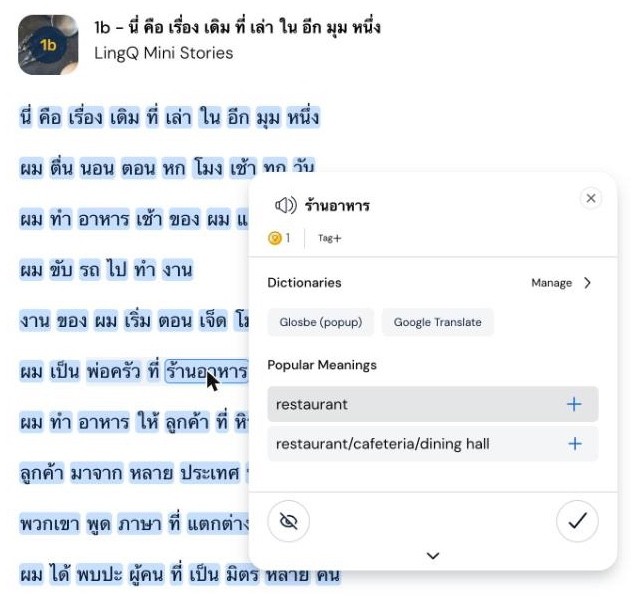
- Start as a beginner. Thai Mini Stories is a 62-lesson beginner course of short, repetitive stories with native audio, so the most common words come back again and again.
- Lots of real Thai. The Thai library includes daily news from Thai PBS, Thairath and PPTV, classic school readers like มานะ มานี (Mana Manee), and beginner stories, alongside graded courses.
- Learn from what you love. Import Thai YouTube videos, Netflix shows, podcasts, articles and ebooks, and they become lessons with the same tools.
- Listen and read together. Scroll mode keeps the text in step with the audio, so you hear the tones while you see the words.
- One subscription, more than 50 languages, with a free plan to start.
Price: free to start. Premium costs $14.99 a month or about $10 a month on the yearly plan.
Best for: anyone who wants to understand real spoken and written Thai, from beginner to advanced.
2) Pimsleur: speaking and tones from day one
Pimsleur’s Thai course is 30 lessons of 30-minute audio that get you repeating and answering out loud from the first day, which is a good way to hear and copy the tones. It also includes separate Reading Lessons that introduce written Thai. It’s a solid start, but it’s a single level, and speaking and listening are the focus. Pimsleur costs about $15 to $21 a month, depending on the plan. LingQ co-founder Steve Kaufmann reviews it in his Pimsleur review.
Best for: getting comfortable speaking basic Thai out loud.
3) Ling: game-like lessons built for Thai
Ling is a language app that focuses on Asian and other less commonly taught languages and has a dedicated Thai course of about 200 lessons in 50 units, going beyond beginner level. Its short, game-like lessons cover vocabulary, grammar, the script and culture, with dialogue practice and, on some devices, an AI Tutor (in beta) for speaking practice. Some lessons are free, and a subscription unlocks the full course. It’s a guided course rather than a way to learn from real Thai content.
Best for: learners who want a guided, game-like Thai course.
4) ThaiPod101: audio lessons explained in English
ThaiPod101 has thousands of short audio and video lessons, from absolute beginner to advanced, many built around a dialogue with a teacher explaining the vocabulary and grammar in English. If you want mostly uninterrupted native Thai, though, you’ll want native content as well. A low-cost Basic plan unlocks most lessons, and pricier plans add more features.
Best for: learners who like a teacher talking them through each lesson.
5) Mango Languages: a structured course, often free
Mango has a Thai course built around everyday conversations, with notes on grammar and culture. It costs $13.99 a month or about $10 a month yearly, but many public libraries in the US and elsewhere give members free access, so check yours before paying.
Best for: beginners who want a free, structured course through their library.
6) Drops: quick vocabulary practice
Drops teaches vocabulary with quick, visual games and native-speaker audio, and it’s a pleasant way to get used to reading Thai words. It’s mainly a vocabulary app, with some basic phrases and listening practice, so treat it as an extra rather than a full course. There’s a free version with limits and a paid plan.
Best for: a few minutes of vocabulary practice a day.
7) italki (or Preply): tutors for speaking
A tutor gives you real conversation practice and corrects your tones as you speak. Beginners can use one for pronunciation and guided speaking, and more advanced learners for free conversation. On italki and Preply, each tutor sets their own price per lesson. Pair lessons with lots of listening and reading, so you have more to say each time.
Best for: speaking practice and feedback on your tones.
Which Thai app is best for your level?
| Your level | Best app | Add |
|---|---|---|
| Complete beginner | LingQ (Mini Stories), Pimsleur or Ling | Drops for the script and first words |
| Beginner (a few hundred words) | LingQ beginner stories and school readers | ThaiPod101 for explanations |
| Intermediate | LingQ with imported YouTube, podcasts and series | A tutor for speaking |
| Advanced | LingQ with Thai news, books and TV | A tutor for polish |
The best way to learn Thai with an app
Whichever apps you use, getting past beginner Thai takes lots of listening and reading in Thai you can mostly understand, ideally every day.
- Start listening from day one, so the tones become familiar before you try to produce them.
- Learn the script early. Romanization helps for a week or two, but common systems, including the official one, leave out the tones, so reading Thai script pays off quickly.
- Read and listen to the same short stories several times.
- Save words as you go and let them come back in new content, instead of drilling lists.
- Move to real content early: Thai YouTube, music, news and series you enjoy.
- Add speaking with a tutor once you understand a fair amount.
Best app to learn Thai: FAQs
What is the best app to learn Thai?
LingQ is the best app to learn Thai if you want to understand real Thai. You learn from news, YouTube, stories and books with one-tap translations, and LingQ automatically splits Thai text into tappable words. Pimsleur is good for speaking and tones, and Ling and ThaiPod101 are built for Thai and other Asian languages.
Does Duolingo teach Thai?
No. Duolingo doesn’t have a Thai course for English speakers, and neither do Babbel, Rosetta Stone or Busuu. Apps that do teach Thai include LingQ, Pimsleur, Ling, ThaiPod101, Mango Languages and Drops.
What is the best free app to learn Thai?
For a free start, use LingQ’s free plan for real reading and listening, the free lessons on Ling and ThaiPod101, and Mango Languages if your public library offers it.
Is Thai hard to learn for English speakers?
It’s a challenge: Thai has its own script, five tones and no spaces between words, and it shares little core vocabulary with English. The US Foreign Service Institute estimates about 1,100 hours of intensive classes for its English-speaking diplomats to reach professional working proficiency. The grammar is fairly simple, though: verbs don’t change for tense or person.
Should I learn to read Thai or use romanization?
Learn to read Thai early. Romanization can help for the first week or two, but there’s no single standard, and it often hides the tones. Reading the script while you listen is an effective way to connect sounds, tones and words.
How long does it take to learn Thai with an app?
It varies a lot by learner, method and how much you speak. Apps get you started, but conversational Thai takes a lot of listening and reading. As a rough benchmark for high-level proficiency, the US Foreign Service Institute estimates about 1,100 hours of intensive classes for its diplomats.
The bottom line
Most big language apps skip Thai, so your choice is narrower than for Spanish or French. Pimsleur, Ling and ThaiPod101 are good structured starters. But the app that decides how far you get is the one where you spend your listening and reading hours.
LingQ gives you hours of real Thai with one-tap translations, beginner Mini Stories and school readers, and lets you import the videos and series you love, from your first story to your first Thai novel.
Start learning Thai with LingQ for free →
Keep reading: How to learn Thai · The best Pimsleur alternatives · The best Duolingo alternatives · The best language learning apps
Cover photo by Khan ishaan on Pexels.


